
A Windows game launcher for Apple Silicon Macs

Ember. Start playing Windows games
on your Mac.

Launch settings tailored to each game, with Ember Flow frame generation. If something goes wrong, ask the AI assistant running on your Mac.

Download for Mac Version 1.0 · Apple Silicon · macOS 14 or later
Games we have tested Game compatibility Launch settings · Test scope · Known issues Scroll down to see Ember turn around

A simple way to launch games

Install, pick a game, and play.

Ember launches Windows games on Apple Silicon Macs. It picks suitable engine and graphics settings for each game. You can change them yourself at any time.

Make the most of your Mac

Give your game the GPU and performance cores.

Graphics run through Metal, with games set to favor performance cores.

Built by Ember

From frame generation to image enhancement.

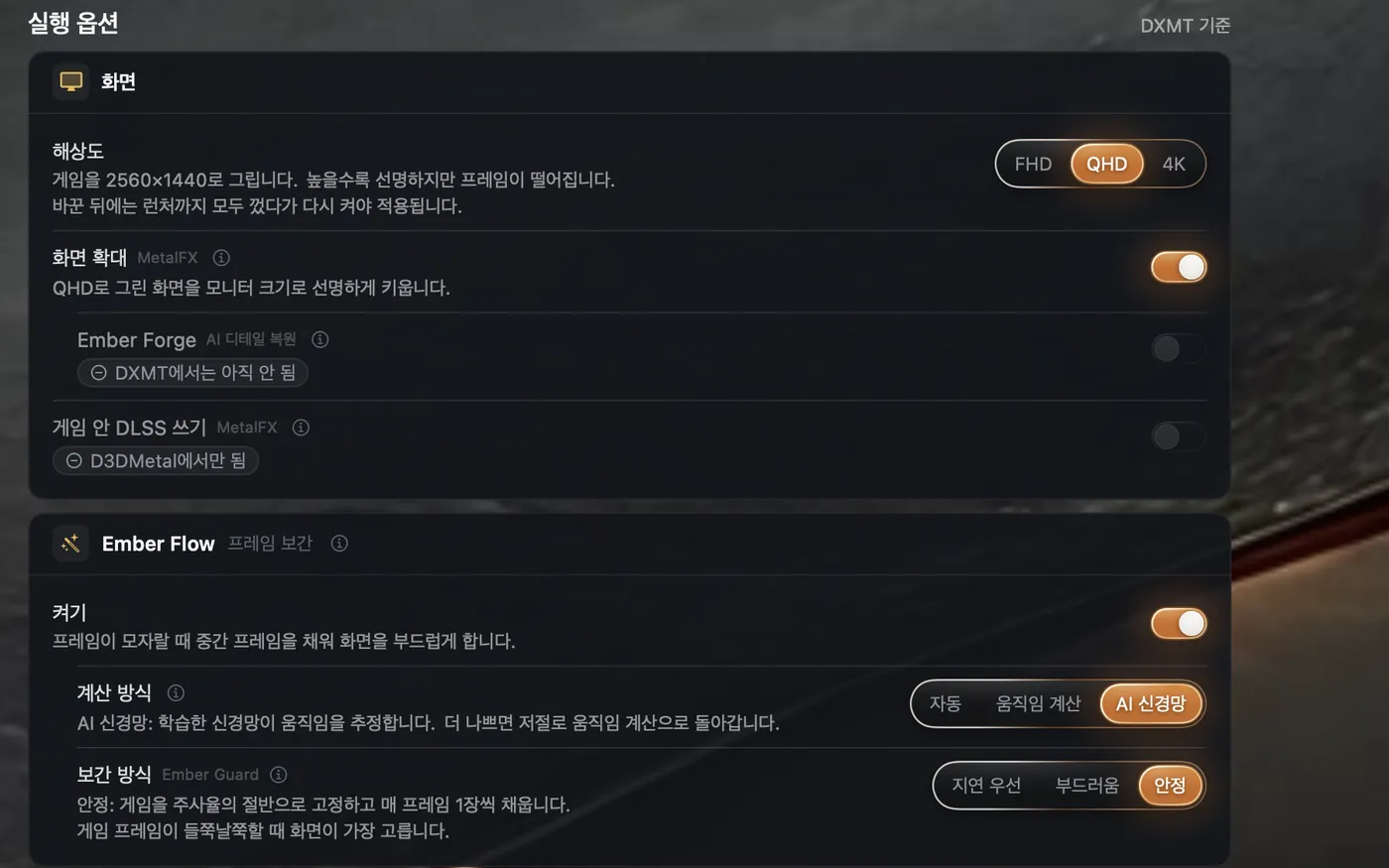
Ember Flow creates intermediate frames, Ember Forge sharpens image detail, and Ember Pulse keeps frames arriving at even intervals.

Ember Flow · Frame generation

Add an extra frame between game frames for twice the output fps.

Display outputUp to 2×

Results depend on the game and settings. Each game record shows both game fps before frame generation and display output fps after it.

11 features built by Ember

Eleven engines developed by Ember.

Flow · Guard · Forge · Tone · Flare · Pulse · Boost · Kindle · Kiln · Spark · Lens. Third-party technologies such as MetalFX, DXMT, and D3DMetal keep their own names. The Ember name is reserved for what we build on top of them.

Windows games,on your Mac.

Ember launches Windows games on Apple Silicon Macs. It selects an engine and graphics translator for each game, and retries with another translator if a game crashes during launch. It also includes Ember's own frame generation, image enhancement, and frame pacing. See the test scope and performance measured on an M4 Pro for each game below.

Game compatibility · Test records

What can you play?

These are games we have run and documented. Select one to see the scenes tested, launch settings, frame rates, and remaining issues.

21 games · Sorted by name

Site updated 2026-10-23
Left 4 Dead 2SteamGameplay testedDXVKDead Center · Local campaign

Gameplay was tested while moving around the rooftop in the first map.

Test environment
M4 Pro · 1600×900 · 120Hz · Playing with bots
Frame-rate record
Game 128–146 fps · Average about 138 fps
Things to know
Tested with Ember's modified DXVK. Results may differ with other DXVK builds.
Record checked
· Frame-rate records may come from separate runs.
Link to this game ↗
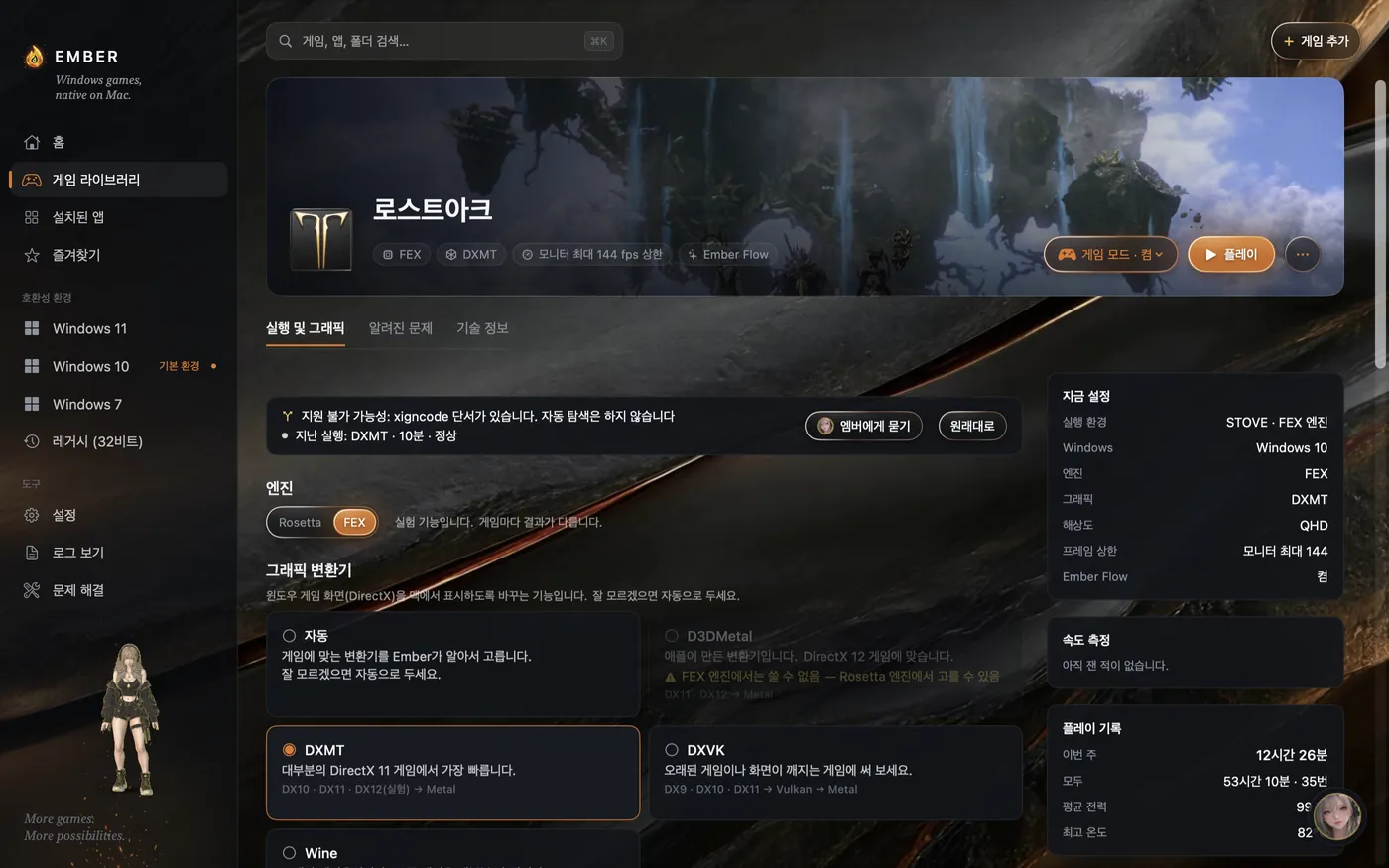
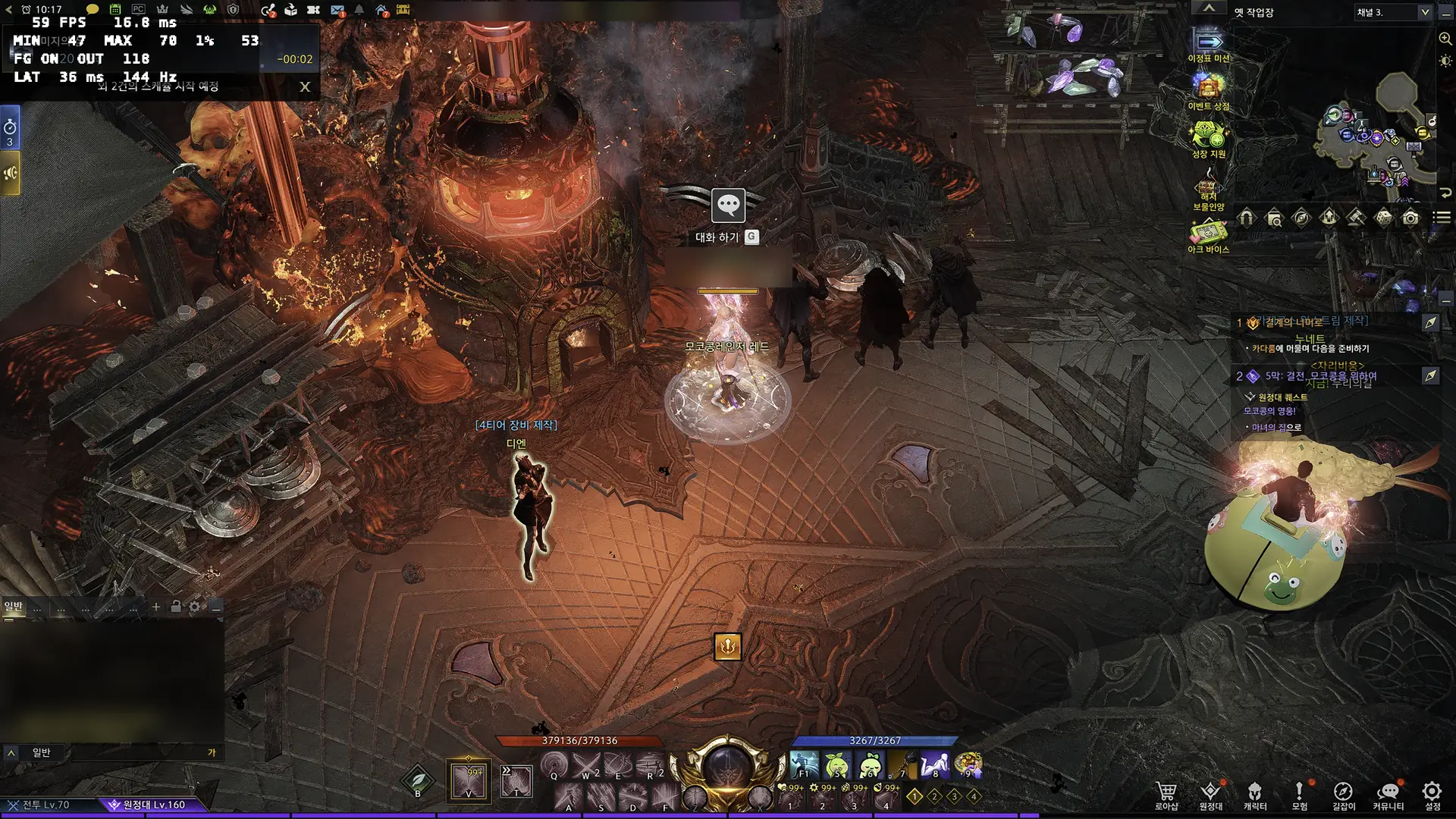
Lost ArkSTOVEGameplay testedFEX · DXMTTown traversal · Waterpark

Town traversal and gameplay were tested. On October 22, FEX ran continuously for 3 hours 9 minutes with no crashes recorded.

Test environment
This Mac (M4 Pro) · FEX · DXMT · QHD · MetalFX · Ember Flow · Game Mode · Separate runs for each item
Frame-rate record
Earlier town measurement: game 47–54 → display 94–107 fps · Crowded scene game fps +7% (50.2 → 53.7) · Separate realignment comparison: median of 1-second maximum frame times about 23–29 → 17–20 ms
Things to know
The first launch may take longer while FEX creates its cache. Intermittent errors remain in the game's web views.
Record checked
· Continuous run: 3 hours 9 minutes · Frame rates from separate runs · Measured on this Mac (M4 Pro)
Link to this game ↗
Lost Ark running in Ember
October 23 capture · Ember Lens at top left · Click for original
Lethal CompanySteamGameplay testedD3DMetal / DXMTLAN host · Inside the ship

Visuals and performance were tested inside the ship as a LAN host.

Test environment
M4 Pro · 60Hz · 30 seconds after entering the ship
Frame-rate record
Game 60 fps · GPU usage about 51% in this scene · Separate measurement (Rosetta · DXMT · 4K · Ember Flow): total latency 51.5 → 43.0 ms · October 21, Rosetta · D3DMetal FHD: game about 120 → display about 139 fps · October 17, FEX · DXMT FHD: display about 155 fps (maximum frame time 19.8 ms)
Things to know
Internet lobbies and online co-op are outside the scope of this record. Korean characters in microphone names may appear as boxes in the game's font.
Record checked
· DXMT latency measurement · Ship gameplay tested on 2026-09-28 · Frame rates may come from separate runs.
Link to this game ↗
Resident Evil RequiemSteam · TrialGameplay testedD3DMetalTrial · First room

The title screen, menus, and gameplay in the first room were tested with D3DMetal. It also launched normally with D3DMetal on October 21, when frame rates were measured.

Test environment
M4 Pro · October 4: 120Hz 4K display · October 21: FHD
Frame-rate record
October 4: about 83 fps stationary · About 70 fps moving · Moving p99 about 50 ms · October 21, FHD Ember Flow: game about 115 → display about 137 fps
Things to know
Movement stutter was recorded on October 4; maximum frame time was not recorded separately on October 21. DXMT shows a black screen, so this game uses Rosetta · D3DMetal. The FEX engine is not supported.
Record checked
· FHD frame-rate measurement · First-room gameplay on 2026-10-04 · Frame rates may come from separate runs.
Link to this game ↗
ValheimSteamGameplay testedDXMT / D3DMetalLaunch · 60-second frame-rate measurement

The intro video and menus were tested, and 60-second frame-rate measurements were taken with both FEX · DXMT and Rosetta · DXMT. A hang at the Steam notice dialog was fixed.

Test environment
This Mac (M4 Pro) · FEX · DXMT · FHD · 60 fps cap · Frame generation off
Frame-rate record
60 fps · Automatic low-latency display queue: internal latency 10.2 → 5.6 ms · October 21, FEX · DXMT FHD: game 60 → display 120 fps (Ember Flow, maximum frame time 28.9 ms) · October 17, Rosetta · DXMT: also 120 fps (maximum 18.6 ms)
Things to know
FEX translates new code, making its maximum frame time about 10 ms longer than Rosetta's. The recorded scene (menu or world) was not specified, so this does not guarantee stability throughout the world or in multiplayer.
Record checked
· Includes Steam notice-dialog fix
Link to this game ↗
Stellar BladeSteam · TrialGameplay testedD3DMetal / DXMT · FEXTrial · Camp and gameplay

Gameplay was tested with D3DMetal. FEX · DXMT and Rosetta · DXMT also ran and measured about 60 fps at FHD (October 22). An intermittent FEX screen freeze was fixed (3 of 9 runs → 0 of 7).

Test environment
M4 Pro · Demo · Separate measurements for each graphics path
Frame-rate record
D3DMetal · Ember Flow · 144Hz: game 60 → average display 116.7 fps · 4K D3DMetal (October 23): game about 34 → display about 55 fps · FHD DXMT (October 22): both FEX and Rosetta about 60 fps · Rosetta D3DMetal smooth mode presentation update: FHD latency 24.2 → 14.1 ms · Output 116.6 → 119.2 fps; QHD latency 24.2 → 15.8 ms · Output 114.0 → 118.8 fps · These figures do not guarantee stability
Things to know
Earlier DXMT runs recorded GPU hangs and visual corruption with FSR3; these were not rechecked in recent measurements. FEX maximum frame times of about 290–307 ms were traced to bringing the window to the front at measurement start (Rosetta also exceeded 600 ms). Treat these separately from D3DMetal results.
Record checked
· 4K measurement · FHD measured on 2026-10-22 · FEX freeze fix checked on 2026-10-19 · Frame rates may come from separate runs.
Link to this game ↗
Stellar Blade running in Ember
Earlier test capture · Trial menu · Click for original
OverwatchSteamGameplay testedD3DMetalSteam version · Gameplay after launch

After a launch failure was fixed, the user confirmed that the game ran with Rosetta · D3DMetal.

Test environment
M4 Pro · Steam version · QHD · User gameplay (October 10) and frame-rate measurement (October 15)
Frame-rate record
QHD measurement (October 15): game about 56–60 fps · GPU usage 94–100%
Things to know
Measurements indicate a GPU limit at QHD, holding performance at about 56–60 fps rather than an Ember bottleneck. FEX remains unconfirmed: it produced no image on October 15 (GPU about 1%). The Korean Battle.net release has separate records; these results do not apply to it.
Record checked
· User confirmed launch on 2026-10-10 · Not retested recently.
Link to this game ↗
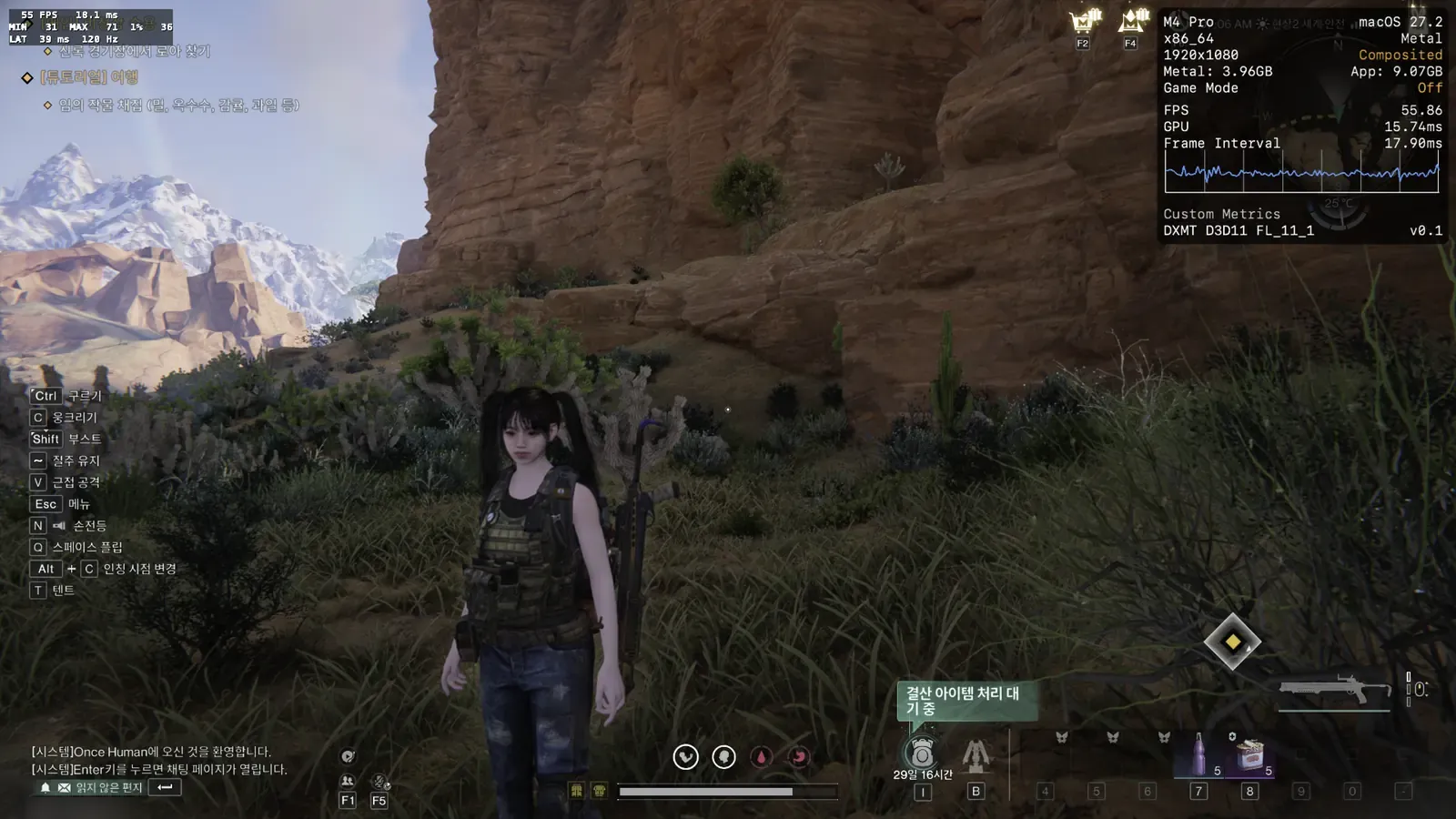
Once HumanSteamGameplay testedD3DMetal / DXMTWorld traversal · Frame generation comparison

World gameplay and frame generation were tested. DXMT tests also compared unique and repeated frames across frame generation modes. A fix keeps the game responsive while the microphone permission dialog is open.

Test environment
M4 Pro · Separate measurements for each graphics path
Frame-rate record
Earlier D3DMetal measurement: display about 114 fps with Ember Flow · October 16, Rosetta · D3DMetal FHD: game about 53 → display about 78 fps · October 17, FEX · DXMT FHD: about 41 fps
Things to know
The display output figures below were measured with D3DMetal and should not be combined with DXMT results. In the October 23 menu run, no pause over 9 seconds occurred while the microphone permission dialog was open. World performance after login was not tested.
Record checked
· Permission-dialog run tested only as far as the menu
Link to this game ↗
Once Human running in Ember
Early October capture · DXMT · Click for original
The Witcher 3: Wild HuntSteam · RemasteredGameplay testedRosetta · D3DMetalDX12 version · 13 minutes in White Orchard

After entering the world using the app's default path, we tested walking, camera movement, water, buildings, combat stances, and menus for 13 minutes. No crashes, hangs, or visual corruption occurred in this run. On October 23, FEX · DXMT with tessellation enabled rendered terrain, water, mud, and a wolf fight correctly.

Test environment
Rosetta · D3DMetal 3.0 record: 1080p · Medium · Shader translation guard · 13 minutes of gameplay. Separate FEX · DXMT tessellation test
Frame-rate record
Rosetta · D3DMetal: 44–50 fps (60 fps cap) · FEX · DXMT tessellation on: 33–35 fps, off: 37–40 fps
Things to know
Tessellation restores correct terrain and water rendering, with about 12% lower frame rates in this scene. Tested only with FEX; the Rosetta path was not measured.
Record checked
· Tessellation visuals and fps tested with FEX
Link to this game ↗
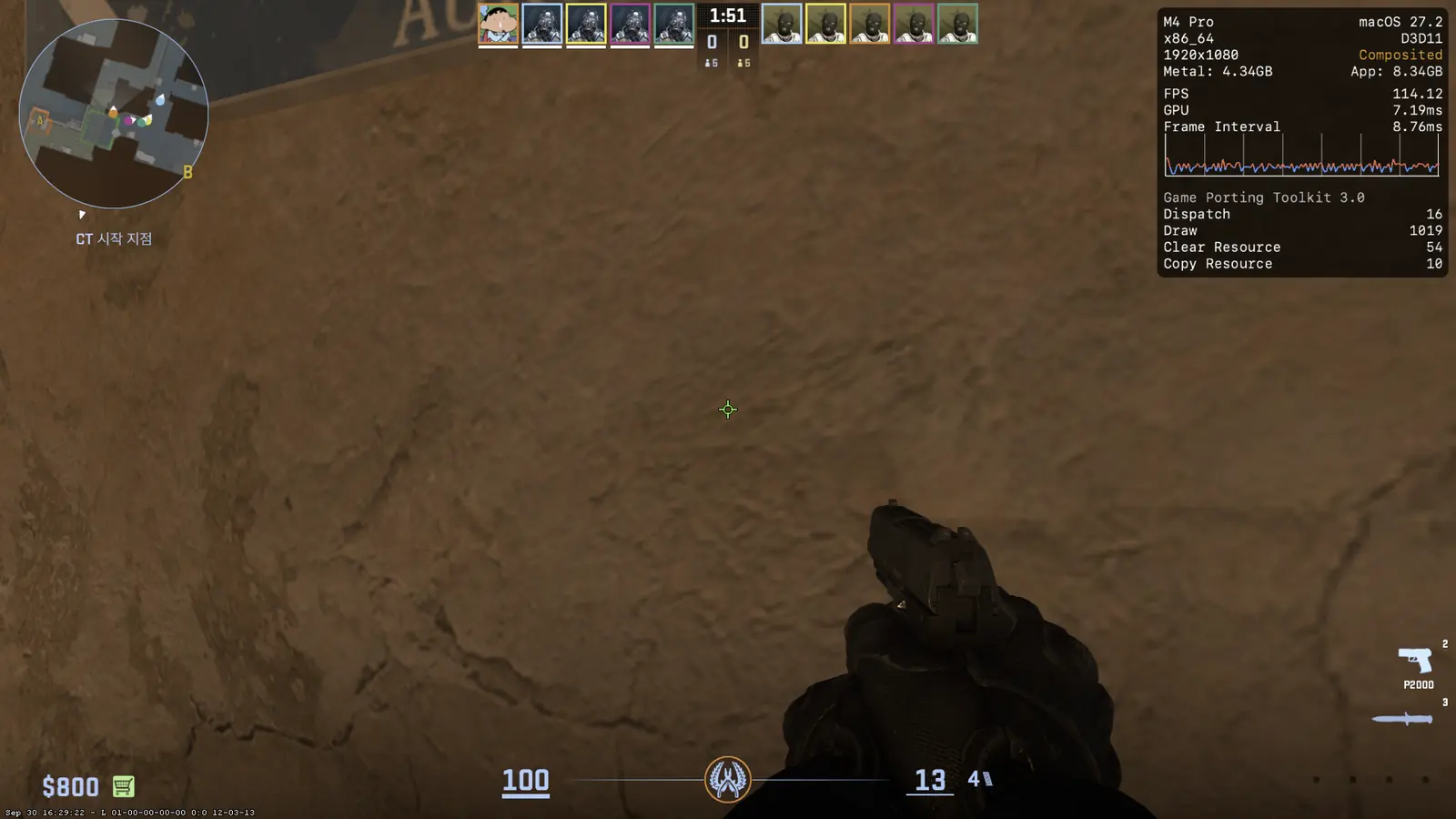
Counter-Strike 2SteamGameplay testedDXMT / D3DMetalDust 2 · Local bot match

Menus, Korean text, audio, and bot matches were tested. FPS defaults prioritize latency: automatic translator DXMT, Ember Flow off, low-latency mode and Ember Spark on.

Test environment
This Mac (M4 Pro) · Rosetta · FHD · Borderless fullscreen · VSync off · Dust 2 offline, 0 bots
Frame-rate record
Median input-to-display latency: DXMT 29.0 ms / D3DMetal 46.2 ms (about 17 ms apart) · Automatic image settings differ by translator, so fps is not directly compared. · Maximum frame time (FHD, October): FEX · DXMT about 60 ms, Rosetta · DXMT about 325 ms
Things to know
The window is invisible in exclusive fullscreen. Use borderless fullscreen. Official matchmaking and VAC servers were not tested.
Record checked
· Separate runs for each item · Measured on this Mac (M4 Pro)
Link to this game ↗
Counter-Strike 2 running in Ember
September 30 capture · D3DMetal path · Click for original
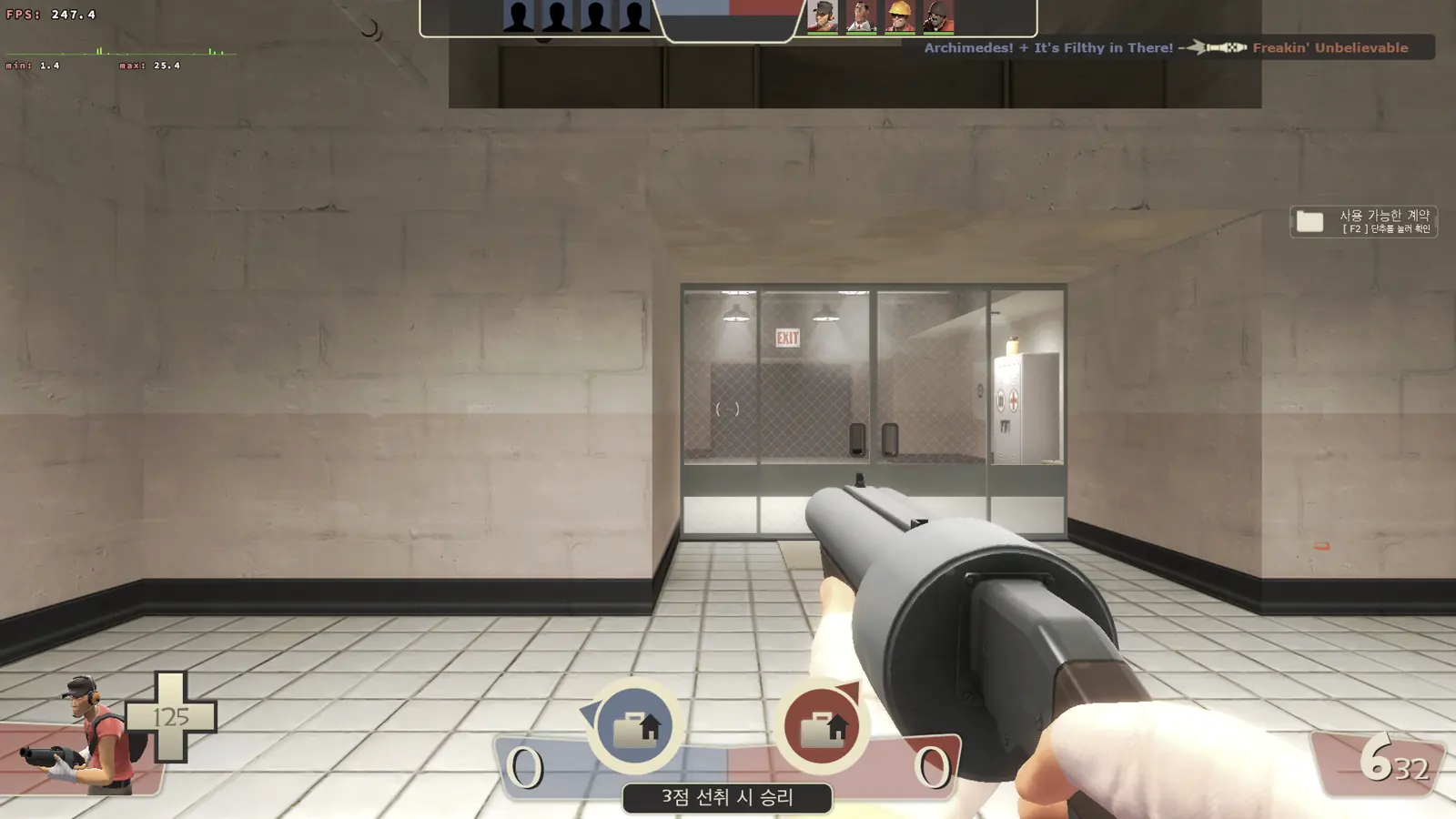
Team Fortress 2Steam · 64-bit versionGameplay testedDXVK2Fort · Local bot match

Menus, Korean text, the intro video, and local-map gameplay were tested. An FEX hang during audio initialization was fixed.

Test environment
M4 Pro · 1920×1080 · 120Hz · VSync off · 8 bots
Frame-rate record
Game 170–190 fps · No frame generation · October 22 FHD: FEX about 258 fps (maximum frame time 23 ms), Rosetta about 263 fps (54 ms)
Things to know
Shader processing may cause a brief pause when first entering a map. Official matchmaking and VAC servers were not tested.
Record checked
· Frame-rate records may come from separate runs.
Link to this game ↗
Team Fortress 2 running in Ember
Earlier test capture · Click for original
PRAGMATASteam · DemoGameplay testedD3DMetalDemo · Tutorial combat

Korean text, cutscenes, and tutorial combat were tested with D3DMetal.

Test environment
M4 Pro 24GB · 1080p · FSR3 Performance · In-game FSR frame generation
Frame-rate record
Tutorial measurement: display 105–115 fps · In-game FSR frame generation
Things to know
The DXMT path still has a black-screen issue. Recorded with a configuration that avoids enabling in-game frame generation and Ember Flow together.
Record checked
· Frame-rate records may come from separate runs.
Link to this game ↗
MuckSteam · Free / TrialGameplay testedRosetta · DXMTFirst launch · Main menu

The main menu appeared in 39 seconds. A 60-second DXMT FHD measurement reached the display limit of 144 fps, with a maximum frame time of 14.6 ms.

Test environment
M4 Pro · First-launch test
Things to know
Results apply only to the scenes and settings tested. Full gameplay and long-term stability were not tested.
Record checked
Link to this game ↗
DELTARUNE DemoSteam · Free / TrialGameplay testedRosetta · DXMTTrial · First screen · 32-bit

Tested with the 32-bit executable. It launched normally to the first screen, recording the game's own 30 fps cap and a maximum frame time of 34.3 ms.

Test environment
M4 Pro · First-launch test
Things to know
Results apply only to the scenes and settings tested. Full gameplay and long-term stability were not tested.
Record checked
Link to this game ↗
Yume NikkiSteam · Free / TrialGameplay testedRosetta · WineTitle screen · 32-bit

The title screen of this 32-bit RPG Maker 2003 game was tested. No frame-rate measurement was taken because it uses the GDI 2D path.

Test environment
M4 Pro · First-launch test
Things to know
Results apply only to the scenes and settings tested. Full gameplay and long-term stability were not tested.
Record checked
Link to this game ↗
Doki Doki Literature ClubSteam · Free / TrialGameplay testedRosetta · WineFirst screen · 32-bit

The initial warning screen displayed correctly. Frame rates were not measured.

Test environment
M4 Pro · First-launch test
Things to know
Results apply only to the scenes and settings tested. Full gameplay and long-term stability were not tested.
Record checked
Link to this game ↗
Aperture Desk JobSteam · Free / TrialHas issuesRosetta · DXMTFirst scene · Controller notice

It waited at Steam's controller connection notice. The first scene displayed correctly after the notice was acknowledged. You need to provide the controller required by the game.

Test environment
M4 Pro · First-launch test
Things to know
Results apply only to the scenes and settings tested. Full gameplay and long-term stability were not tested.
Record checked
Link to this game ↗
Ghostrunner DemoSteam · Free / TrialMenu testedRosetta · DXMTTrial · Intro video

The intro video played correctly. We did not check whether the game reached the menu after the video.

Test environment
M4 Pro · First-launch test
Things to know
Results apply only to the scenes and settings tested. Full gameplay and long-term stability were not tested.
Record checked
Link to this game ↗
Dome Keeper DemoSteam · Free / TrialHas issuesRosetta · Wine / FEX · WineTrial · Title screen

The first combination, Rosetta · Wine, crashed after 15 seconds. FEX · Wine kept the game window open and recorded 93 fps, but Korean glyphs appeared as boxes. The combination was found through automatic discovery and was not saved.

Test environment
M4 Pro · First-launch test
Things to know
Results apply only to the scenes and settings tested. Full gameplay and long-term stability were not tested.
Record checked
Link to this game ↗
Warzone 2100Steam · Free / TrialHas issuesRosetta · WineWaiting at startup notice

The game displayed a notice that it was running under Wine and waited for confirmation. The actual game screen after closing the notice was not tested.

Test environment
M4 Pro · First-launch test
Things to know
Results apply only to the scenes and settings tested. Full gameplay and long-term stability were not tested.
Record checked
Link to this game ↗
Black Myth: Wukong Benchmark ToolSteam · Free / TrialHas issuesRosetta · D3DMetalBenchmark launch · Driver warning

The benchmark executable launched but waited at Unreal Engine's AMD graphics driver warning. The benchmark scene and performance were not tested.

Test environment
M4 Pro · First-launch test
Things to know
Results apply only to the scenes and settings tested. Full gameplay and long-term stability were not tested.
Record checked
Link to this game ↗

Gameplay results apply to the scenes and settings listed. They do not guarantee every part of a game or online matchmaking will work. Games without records are not listed. Game names and images belong to their respective developers and publishers.

Reading the frame-rate records

Check the conditions, too.

These figures were measured on this Mac (M4 Pro). They include earlier measurements and changes through October 23. Results vary with the scene and settings and are not latency guarantees.

Game fps

Frames actually rendered by the game. Rates vary by map, resolution, and settings, even within the same game.

Display output fps

With frame generation enabled, this includes intermediate frames. Ember Flow and in-game frame generation are listed separately.

Test scope

Menus, local bot matches, trials, and online play are distinguished. Stutter and hangs are noted even when average fps is high.

Measurements from October 18–20

Responsiveness and stutter matter, too.

Ember Flow · Frame generation

Rosetta · D3DMetal smooth mode recorded internal presentation latency of 24.2 → 14.1 ms in the Stellar Blade demo at FHD with MetalFX off.

Ember Spark · Input latency management

DXMT low-latency mode automatically sets the display queue to 2 frames when the game keeps up with its fps cap, or 3 when it cannot. A synthetic GPU-load test measured median input-to-display latency of 49.7 → 37.8 ms and game fps +26%. Valheim with FEX, FHD, a 60 fps cap, and frame generation off measured internal latency of 10.2 → 5.6 ms.

Lost Ark · Frame-rate improvement

Retrieving GPU results sooner raised game fps by +7% (50.2 → 53.7) in a crowded scene. A separate realignment comparison reduced the median of per-second maximum frame times from about 23–29 → 17–20 ms.

Measured on this Mac (M4 Pro). Evidence: 10/18–19 smoothjob presentation measurements, 10/19 spinless, and 10/20 fpslat · realign A/b16 comparisons. DXMT internal latency measures render queue plus presentation, and differs from input-to-display latency. Input-to-display uses the capture/compositing path and excludes the monitor's own latency. Improvements from separate runs were not added together. View measurement conditions

Features built by Ember

More than getting games to run on a Mac

Once a game is running, Ember's own engines get to work: Ember Flow · Forge · Tone · Flare · Pulse · Boost · Kindle · Kiln · Spark · Lens · Guard. Select beside a name to see how it works and its measurements.

Ember FlowFrame generation

Fill the gaps between frames while managing latency

Ember's own frame generation engine draws a new frame between two game frames. Even as a game fluctuates around 60~100fps, it fills the display evenly within your monitor's refresh rate (such as 120 or 144Hz).

  • Fill as neededFills only the gaps, without slowing the game itself.
  • Motion compensationBuilds intermediate scenes along the paths objects move.
  • Text protectionEmber Guard Keeps nameplates and HUD text from smearing.
  • Latency managementDrains the queue and uses low-latency mode to keep input responsive. If frame generation delays the display, it pauses briefly to prioritize response. Overwatch (D3DMetal), with frame generation on: latency 44.5 → 25.2 ms. Lethal Company (Rosetta · DXMT, 4K) recorded internal latency of 51.5 → 43.0 ms.
  • Even outputFixed frame generation stopping whenever latency briefly exceeded its limit. Stellar Blade (D3DMetal, 144Hz) display output used to vary between runs from 72~117 fps; the average rose from 109.6 → 116.7 fps, with latency increasing by less than 1 ms. Rosetta D3DMetal smooth mode changed its presentation method, taking Stellar Blade FHD latency from 24.2 → 14.1 ms, output 116.6 → 119.2 fps(QHD 24.2 → 15.8 ms, 114.0 → 118.8 fps).
  • Fewer long pausesIn one Once Human session (Rosetta · D3DMetal · 4K), pauses over 50 ms fell from 6 → 0. This is a single-session result; an improvement in overall output variation was not confirmed.
  • HDR color protectionFor HDR (PQ) games in D3DMetal, frame generation stops and original frames are displayed to preserve color. The Witcher 3 displayed without color or brightness errors in our test.
  • Frame generation HUDEmber Lens Shows FG ON and LAT (latency) in the corner of the game. If frame generation pauses, it also shows the actual reason.
  • Flow neural networkA neural network trained by Ember reads motion to create intermediate scenes. It is the default in Auto mode, and at 4K its cost is about 60% of the previous method.
  • Frame generation engine 1.6In Lost Ark (FEX · DXMT), skipped neural frame generation frames fell from 76~133 per 120 seconds → 0.
  • Ripples and foliageGenerates frames even in scenes with scattered fine detail, without repeating original frames.
  • Generate frames before upscalingWith MetalFX, frame generation runs at the pre-upscale resolution to reduce GPU load. Lost Ark game fps rose by 10%.
  • Lightweight upscalingGenerated frames use a lightweight single-pass upscale instead of MetalFX. Lost Ark game 49.7 → 51.6 fps, with text and HUD unchanged.
  • Ember PrismExperimental and off by default. When enabled, it uses Apple's frame generation engine in Rosetta · D3DMetal games to prioritize image quality, with a small latency increase. Works with Ember Flow on macOS 26 or later.
Frames over 200 ms: 10 game frames, one every 20 ms; 20 display frames, one every 10 ms. Even display slots are real frames; odd slots are drawn by Ember Flow. Game 50 fps Display 100 fps 0100200 ms
An example of how it works. At 50 game fps, an Ember Flow frame (orange) is inserted between each pair of real frames (gold), doubling display output exactly.

See real measurements by game ↗

Ember GuardText and nameplate protection

Keeps text and nameplates from smearing in Ember Flow's intermediate frames. If sharp strokes occupy the same position in the original frames on either side, they are preserved unchanged.

Details
  • Image qualityOnce Human, 8 scenes: PSNR 25.0 → 26.3 dB.
  • DefaultAlways enabled alongside Ember Flow.

95→0%

Frame generation skip rate in Lost Ark's waterpark

Ember ForgeAI detail restoration

After MetalFX doubles the image dimensions, an AI model built by Ember refines blurred detail and overly sharp edges, restoring detail lost when running at a lower resolution.

Details
  • OverheadAbout 1.4 ms extra GPU time for FHD → 4K (M4 Pro).
  • In gameOnce Human stayed at 60 fps with it both on and off.
  • DefaultOff. Enable it in game settings. Works in D3DMetal when scaling FHD to exactly twice its dimensions at 4K.

−33~57%

Difference from original (LPIPS), compared with MetalFX alone

Ember ToneAI image refinement

Naturally refines color and contrast. A color lookup table is created once at launch, then each frame simply reads that table.

Details
  • Using togetherOnce Human stayed at 104 fps even with Ember Flow enabled alongside it.
  • DefaultOff. With Battery Mode enabled, it switches off automatically when unplugged.

0.3ms

GPU time per frame (QHD 0.3~0.4 ms)

Ember FlareNative HDR · AI Auto HDR

HDR games send their HDR10 (PQ) 10-bit output directly to the Mac's HDR display. SDR games can also show brighter highlights in HDR while leaving text and menus unchanged.

Details
  • Accurate brightnessSDR white at 100 nit stays at 100 nit.
  • Brightness mappingBrightness beyond the display's peak is mapped using BT.2390.
  • Both graphics pathsWorks the same in DXMT and D3DMetal.
  • Frame generation and HDRHDR (PQ) games in D3DMetal display original frames instead of frame generation to preserve color. Tested in The Witcher 3.
  • RequirementsRequires an HDR-capable display. Auto HDR is off by default, and turns off when a game enables HDR itself.

0.8ms

GPU time per frame at 4K (1080p: 0.3 ms)

Ember PulseFrame pacing

Measures when the display will accept the next frame and submits it at that moment, keeping output evenly spaced and reducing latency.

Details
  • LatencyOnce Human: 12.6~15.3 → 4.5~6.4 ms.
  • DefaultEnabled automatically in DXMT (D3D11) games. Disables itself in scenes with high GPU usage.

55–101→4–10

Pauses over 25 ms in Once Human

Ember BoostGame Mode boost

Changes how games launch so macOS Game Mode recognizes games launched through Ember. Priorities help keep game threads and the Wine server on performance cores. Whether to enable it is decided by measurement.

Details
  • Off · On · AutoAuto uses Frame Check to measure both on and off, then picks the faster option.
  • Switch while runningChange it without closing the game.
  • Performance coresWith video encoding in the background, time on performance cores rose from 81 → 94%.
  • Power for the GPUFixed Windows timer threads that were spinning needlessly, freeing CPU power for the GPU. In the same Lost Ark scene: 44.2 → 46.4 fps.
  • Accurate timersAverage Sleep error 5 ms → 0.04 ms. 60 Late frames in fps-capped games: 32% → 2%.
  • Lost ArkWith FEX: Game Mode about +7%, timer fix +4.7%.

61.2→64.0

Lost Ark fps with background video encoding

Ember KindleAhead-of-time translation

Uses code lists collected from previous runs to fill the FEX translation cache while your Mac is idle, reducing stutter at launch.

Details
  • StutterPauses over 50 ms: 4 → 1.
  • DefaultWorks automatically for FEX games, only while connected to power. Stops as soon as you launch a game.

4.1–4.3→2.3–2.4

Seconds until Lost Ark's web view appears

Ember KilnShader preparation

Prepares shaders while the game is closed, reducing shader-related pauses in new scenes and first battles.

Details
  • Once HumanFirst-entry pause with Rosetta: 11.8 → 0.8 seconds.
  • First 45 seconds in townLost Ark game fps: 50 → 59.
  • Shader-heavy gamesPrepares shaders in batches, even in games such as Lost Ark with 16,000 shaders. Pauses of 0.6~1.3 seconds recurring for 25 seconds after teleporting were reduced to one pause on arrival. There were 0 pauses over 100 ms in the first few minutes of a new area.
  • DefaultOn by default for DXMT games. Preparation runs after the game closes, so it does not run during play.

30.5→0.6

Shader-related pause on Lost Ark's first launch, seconds

Ember SparkReduce input latency

Briefly holds the game back from starting the next frame too early. This lets the frame include more recent input, reducing the time until your action appears on screen.

Details
  • Lethal CompanyInput latency at a 60 fps cap: 37~39 → 18~29 ms.
  • Performance impactfps and display p99 were unchanged.
  • DefaultOn by default for DXMT games. Turns off automatically when Ember Flow is enabled.

35–39→26–28

Valheim input latency at a 60 fps cap, ms

Ember LensIn-game HUD

Draws fps, latency, frame generation status, boss panels, and Ember speech bubbles directly into game frames, without separate windows.

Details
  • OverheadTwo panels: 0.03~0.06 ms GPU time (4K).
  • Latency1.3~1.7 ms less than a separate window (Once Human).
  • DefaultDraws within the game image. Automatically falls back to a separate window for games that cannot support it (D3D12, DXVK, etc.).

+1.5–1.8

Higher fps than a separate window (Once Human)

27→5ns

ARM translation engine

Faster ARM translation without Rosetta

FEX translates x86 game code into ARM instructions. Ember adds ahead-of-time translation and faster call paths.

  • Faster API transitionsPer system call: 27 ns → 5 ns.
  • Shorter rendering pathD3D draw call: 0.294 → 0.158 µs.
  • Ahead-of-time translationEmber Kindle Translates ahead while idle to reduce first-launch stutter.
  • Persistent translation cacheSaves code to disk that Unity (Mono) games used to retranslate on every launch. Valheim's maximum frame time fell from 27.8 → 18.9~20.4 ms, matching Rosetta. FEX cache improvements made initial translation 2.7~13× faster, and cache blocks left unsaved on exit fell from 20% to 0% in offline tests.
  • Lost ArkMedian of maximum frame times over 5-second intervals: 38 → 22 ms.
  • LaunchersEpic Games Launcher reaches the login screen with FEX, succeeding in all 8 repeated tests. EA app and GOG GALAXY also reach login with FEX; GOG GALAXY takes 16 seconds to show its window.
  • Starting Steam gamesFixed Steam games hanging at a pre-launch notice. The Witcher 3: 6 hangs in 16 attempts → 0 in 23.
  • StabilityFixed several FEX hangs and crashes, including a game hang caused by a thread exiting while holding a lock. Stellar Blade's intermittent screen freeze fell from 3 of 9 runs → 0 of 7, and Team Fortress 2's audio-initialization hang was also fixed.
  • ArchitectureTranslates x86-64 code to ARM64. Choose the engine for each game.

DX9–12

Automatic translator selection · Recovery

Pick the fastest translator for each game, and retry with another after a crash

Ember picks a suitable translator from DXMT, D3DMetal, and DXVK, which convert DirectX graphics to Metal. If a game crashes during launch, it retries with another translator. You can also select one manually for each game.

DX9 – DX12 → MetalD3DMetal is detected and used if Apple's Game Porting Toolkit is installed

97.5%

Lost Ark boss mechanics

See the next mechanic ahead of time, right in the game

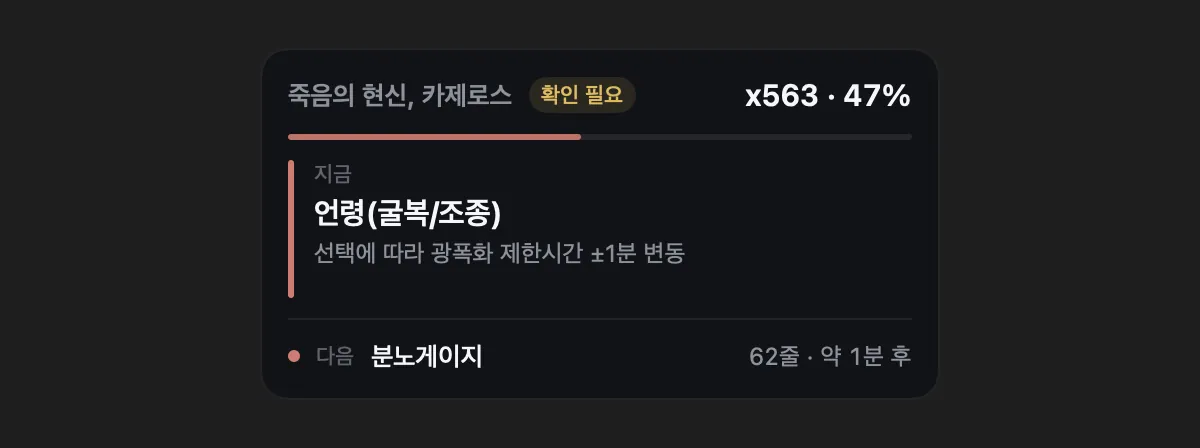
During raids, reads the visible boss name and HP-bar count locally on your Mac, then displays the next mechanic prominently through Ember Lens.

  • Boss guides33.
  • RecognitionBoss names: 97.5%; HP-bar count: 94.6% (11 test videos).
  • SafetyReads only on-screen text, without accessing game memory or inputs. Use is subject to the game's terms.

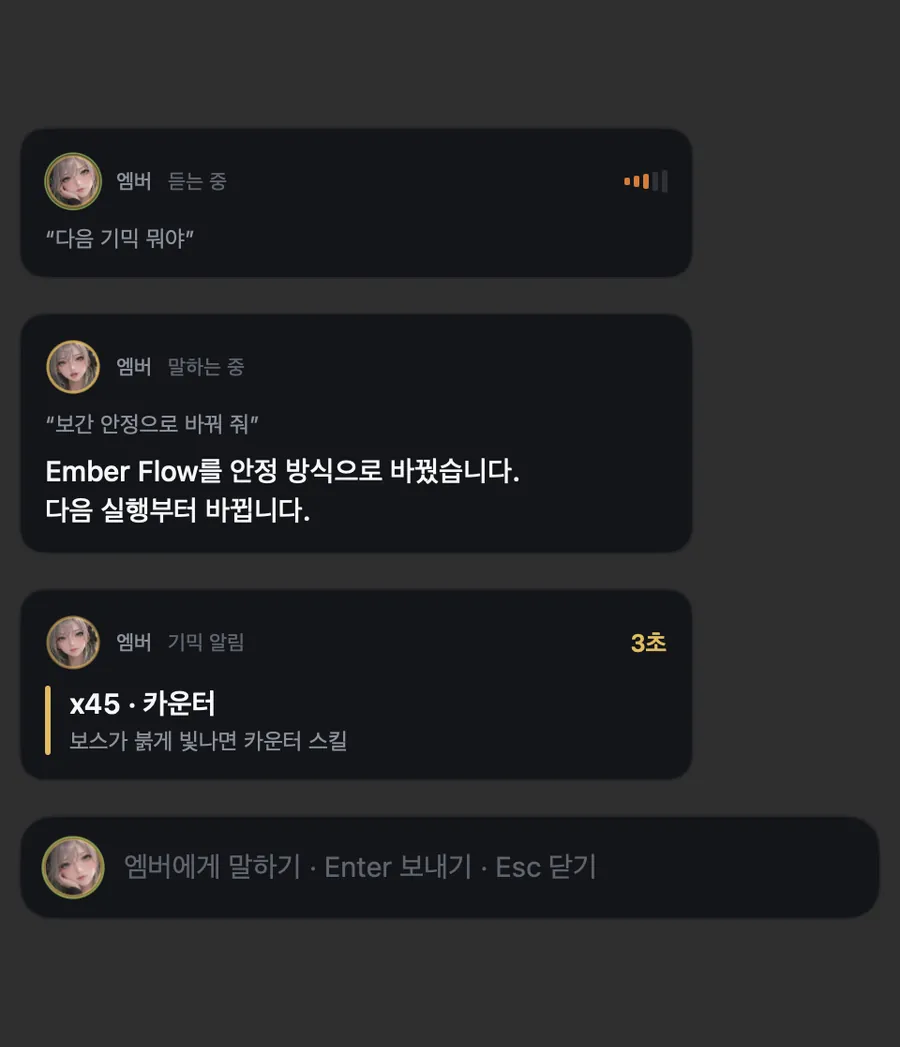
On-device AI assistant · Ember

Ember

“Hey Ember, launch Lost Ark, then in 30 minutes remind me.”

Speak to Ember to handle even multi-step requests at once. Speech recognition and response generation both run on your Mac.

Ember speech bubbles over a game: listening, settings replies, and mechanic alerts
Ember speech bubbles over your game
Game
Launch, quit, and measure fps
Time
Timers and reminders
Mac status
Check temperature and memory
Settings
Change and undo
Screen
Translate and explain game screens
Voice
Natural synthesized speech
Listening
Recognizes the Korean wake phrase “Ember-ya” even over game audio
Troubleshoot
Uses launch logs to explain causes and next steps; when evidence is missing, starts by explaining how to check
Conversation
Follow up naturally with requests such as “MetalFX too” or “the other way”
Proactive alerts
Speaks up when fps drops or temperatures rise
Why is it stuttering?
Explains causes and fixes based on measurements
Lightweight
Checks every 5 seconds using 0.3 ms

Recognized all 32 of 32 calls over game audioProcessed entirely on deviceWake phrase requires macOS 26 or laterTroubleshooting responses: self-assessed score across 48 questions, 5.2 → 8.6/10

Ember in the app · Animated backgrounds

Ember moves around the app

These videos are direct recordings of the Ember app. Only for recording, the intervals between outings and tab changes were shortened.

Usually rests below the sidebar, then goes for a walk every 1~2 minutes.

Ember explores the screen.

Peeks out from behind cards, sits on image edges, and follows tab changes. You can also pick Ember up and move it with the mouse.

  • Animations16
  • App CPU usage (one core)About 17% on average
  • When a game opensHides and pauses
  • Turn offSettings → General → Display
Ember follows tab changes against an animated background. Animation pauses while a game is running or the window is covered, and is disabled with Reduce Motion or Low Power Mode.

Explore the app

Many features, one app

Games, settings, troubleshooting, and Ember all live in one app. Detailed settings stay collapsed to keep screens clear. Buttons are orange glass capsules, and selectors glide toward your choice like a drop of water.

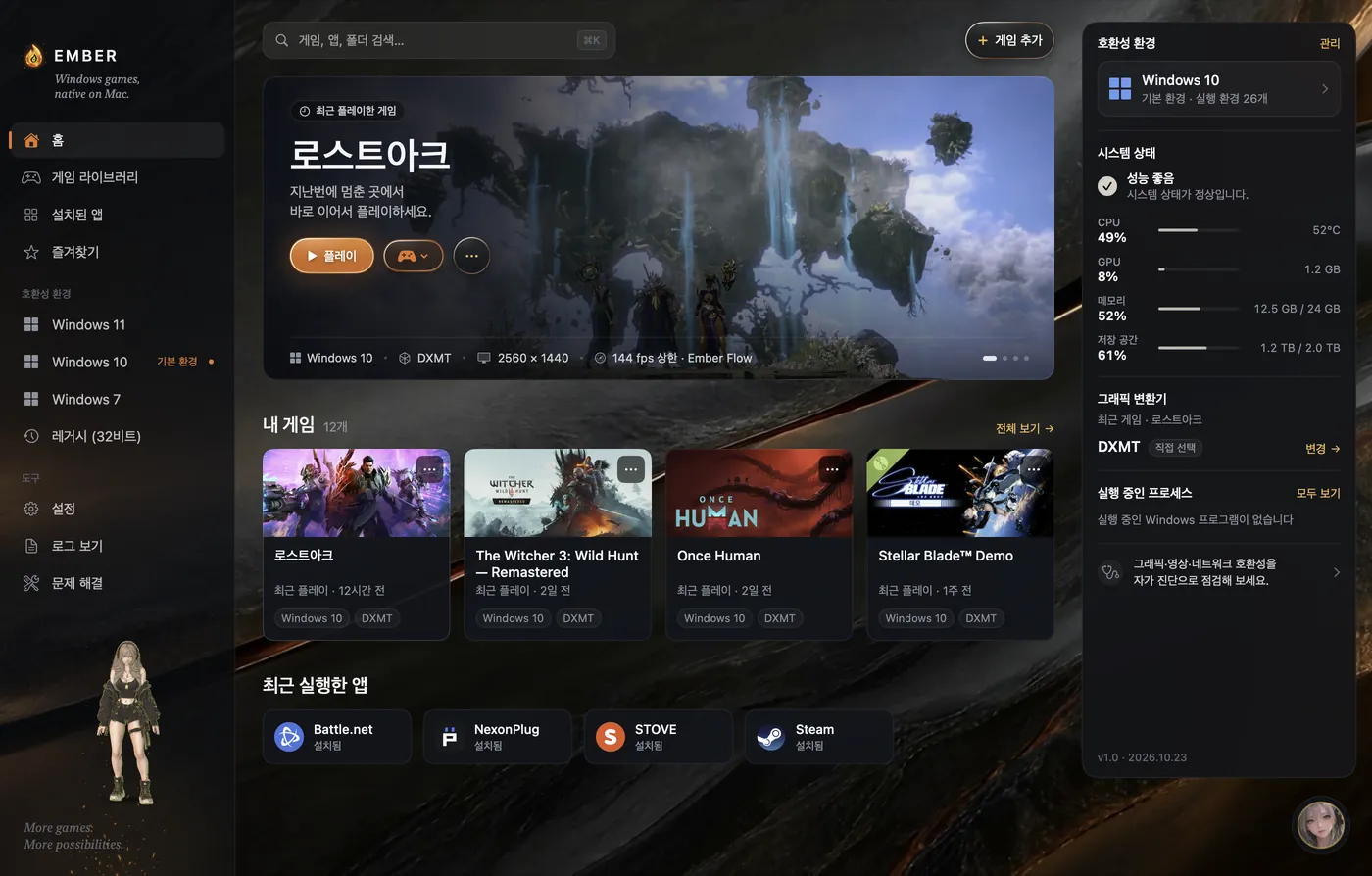
Ember home screen: recently played Lost Ark, game library, and system status
Home · Recent games and Mac status at a glance

Licenses & Notices tab

In Settings → Licenses & Notices, the app lists open-source software included in Ember, LGPL components modified by Ember, and notices and source information for separately installed components. The same information is available on the Licenses & Notices page.

More features

Ember Wayfinder
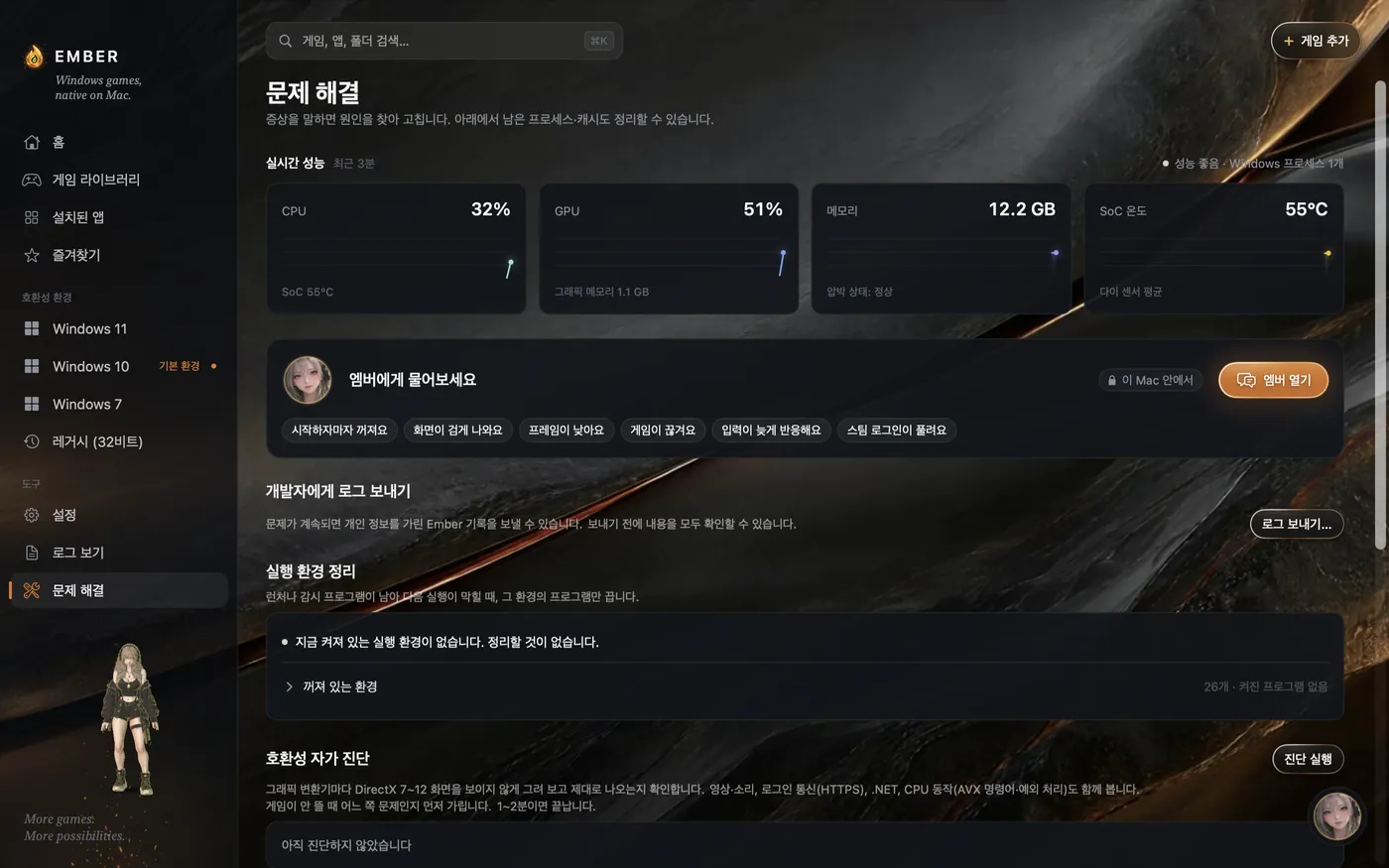
Tries launch combinations in sequence for games that fail to start, then lets you save one. It first tries known launch options and recommended translators, then other supported translators and engines. If a Steam game crashes under Rosetta, it also checks the FEX path sharing the same installation.
Find, save, and undo

Tests with add-ons disabled, using only installed bottles. It will not start while a game or Wine launcher is running, or test anti-cheat games. Games and launchers opened by each trial are closed afterward, and files changed during testing are restored.

Launch-success detection, settings saving, and undo were tested in Valheim and The Witcher 3. The Witcher 3 success detection relies on indirect evidence from a D3DMetal hook, game window, and CPU activity. It does not guarantee gameplay or long-term stability.

A discovered combination is saved only when you choose “Save these settings.” Add-ons are preserved, and you can turn them on and recheck if you wish. Use “Revert settings” to undo a saved configuration.

Frame Check
Measures the same scene with different settings and shows which is faster in numbers.
Shader cache
Keeps shaders once created to reduce stutter from the second launch onward.
Fast synchronization (msync)
Handles Windows program synchronization directly inside Ember, making it 22× faster.
Launcher support
Runs Steam, Epic, Battle.net, and STOVE inside Ember, keeping your Steam login. EA app and GOG GALAXY were tested as far as their login screens; completed login, game installation, and launch still need separate tests. Installed games appear on Home. An FEX Steam startup hang was also fixed: The Witcher 3 launch tests went from 6 hangs in 16 attempts → 0 in 23 (these are not successful gameplay counts).
Uninstall games
Use the ⋯ menu beside Play. Steam, STOVE, and Battle.net use their launcher's official uninstall; other games go to the Trash. The path and size are shown first.
Older-game cutscenes
Includes AVI video codecs so cutscenes in older games do not appear as black screens.
Older-game audio
Preserves audio in older games using DirectSound.
Korean fonts
Automatically selects fallback fonts to keep Korean text in Windows programs from appearing as boxes.
Compatibility environments
Choose a Windows 11, 10, or 7 environment per game. Running 32-bit games with FEX is experimental and must be enabled in settings.
Add games from folders or ZIP files
Games without installers can be added to your library by choosing a folder or opening a ZIP file.
Dialog alerts
Ember notifies you when a game is waiting at a notice or confirmation dialog. Check the dialog yourself to continue.
Microphone permission dialog
Limits voice-input initialization time so a microphone permission dialog does not leave the game unresponsive. Microphone input may not be ready while the permission dialog is pending.
Per-game launch options
Set frame caps, resolution (FHD · QHD · 4K), and upscaling for each game. Options are grouped into Display, Ember Flow, Frames & Latency, Image Refinement, Experimental, and Advanced.
Launch logs
View what went wrong in the logs and ask Ember about them directly. Ember AI suggests actions based on the game and recent settings changes, keeping applied settings reversible.
Ember updates
An automatic update bar shows progress from checking for new versions through download and installation.
Send diagnostic logs
Choose what to include and review a preview with personal information masked. Logs are sent only with your consent. Saving to a file keeps them on your Mac. Privacy Policyexplains retention and deletion.
Battery and heat
Battery Mode is opt-in. Performance comes first by default.
Prepare ahead
When you are not playing, Ember Kindle prepares translations and Ember Kiln prepares shaders.

Ember 1.0

Start playing Windows games on your Mac.

Download for Mac

  • MacApple Silicon (M1 or later)
  • macOS14 Sonoma or later
  • Korean wake phrase “Ember-ya”macOS 26 or later
  • D3DMetal pathWith Apple's Game Porting Toolkit installed